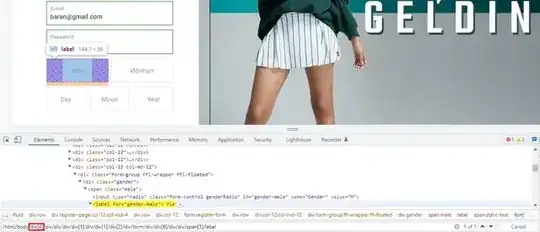
I want to get data from the txt file line by line. The program does not continue to run after the email line. How can I fix this?
from selenium import webdriver
import time
from selenium.webdriver.remote.webelement import WebElement

def slow_type(element: WebElement, text: str, delay: float=0.1):
    """Send a text to an element one character at a time with a delay."""
    for character in text:
        element.send_keys(character)
        time.sleep(delay)

browser = webdriver.Chrome()
browser.get("https://www.sneaksup.com/register")


with open('Gmail.txt') as f:
    lines = f.readlines()

for l in lines:

    browser.get("https://www.sneaksup.com/register")
    browser.find_element_by_xpath("//*[@id='FirstName']").send_keys("Baran")
    browser.find_element_by_xpath("//*[@id='LastName']").send_keys("Baran")

    sif = "187400Baran*"
    sifre = browser.find_element_by_xpath("//*[@id='Password']")
    slow_type(sifre, sif)
    time.sleep(0.5)
    el = browser.find_element_by_xpath("//*[@id='Phone']")
    text = "5511939262"
    slow_type(el, text)
    browser.find_element_by_xpath("//*[@id='Email']").send_keys(l)
    time.sleep(0.5)
    browser.find_element_by_xpath("/html/body/div[5]/div/div/div/div[1]/div/div[1]/div[2]/div/form/div/div[6]/div/div/span[1]/label").click()
    time.sleep(0.5)
    browser.find_element_by_xpath("//*[@id='DateOfBirthDay']/option[14]").click()
    time.sleep(0.5)
    browser.find_element_by_xpath("//*[@id='DateOfBirthMonth']/option[6]").click()
    time.sleep(0.5)
    browser.find_element_by_xpath("//*[@id='DateOfBirthYear']/option[93]").click()
    browser.find_element_by_xpath("//*[@id='AcceptKVKK']").click()
    browser.find_element_by_xpath("//*[@id='register-button']").click()
    browser.quit()