3

Is it possible to line up the "Register" button to right align it w/in col2?

Here's the markup:

<asp:CreateUserWizard ID="CreateUserWizard1" runat="server" CreateUserButtonText="Register" ContinueDestinationPageUrl="~/Secure/PromotePandaVisa.aspx">
    <SideBarTemplate>
        Sidebar template
    </SideBarTemplate>
    <WizardSteps>
        <asp:CreateUserWizardStep runat="server">
            <ContentTemplate>
                <table border="0" cellpadding="2" cellspacing="2">
                    <colgroup>
                        <col width="120px"/>
                        <col width="150px" />
                        <col />
                        <tr>
                            <td class="CaptionLabel" colspan="3" style="white-space: nowrap; padding-left:10px; padding-top: 5px; padding-bottom: 15px;">
                                <asp:Label ID="Label1" runat="server" CssClass="LargeCaption LightText" Text="Register as an Affiliate"></asp:Label>
                                &nbsp;
                            </td>
                        </tr>
                        <tr>
                            <td align="right">
                                <asp:Label ID="UserNameLabel" runat="server" AssociatedControlID="UserName" CssClass="DefaultLabelCaption">User Name:</asp:Label>
                            </td>
                            <td>
                                <asp:TextBox ID="UserName" runat="server" CssClass="DefaultTextBox TextboxWidth"></asp:TextBox>
                            </td>
                            <td>
                                <asp:RequiredFieldValidator ID="UserNameRequired" runat="server" ControlToValidate="UserName" Display="Dynamic" ErrorMessage="User Name is required." ToolTip="User Name is required." ValidationGroup="CreateUserWizard1">Required</asp:RequiredFieldValidator>
                            </td>
                        </tr>
                        <tr>
                            <td align="right">
                                <asp:Label ID="PasswordLabel" runat="server" AssociatedControlID="Password" CssClass="DefaultLabelCaption">Password:</asp:Label>
                            </td>
                            <td>
                                <asp:TextBox ID="Password" runat="server" CssClass="DefaultTextBox TextboxWidth" TextMode="Password"></asp:TextBox>
                            </td>
                            <td>
                                <asp:RequiredFieldValidator ID="PasswordRequired" runat="server" ControlToValidate="Password" Display="Dynamic" ErrorMessage="Password is required." ToolTip="Password is required." ValidationGroup="CreateUserWizard1">Required</asp:RequiredFieldValidator>
                            </td>
                        </tr>
                        <tr>
                            <td align="right">
                                <asp:Label ID="ConfirmPasswordLabel" runat="server" AssociatedControlID="ConfirmPassword" CssClass="DefaultLabelCaption">Confirm Password:</asp:Label>
                            </td>
                            <td>
                                <asp:TextBox ID="ConfirmPassword" runat="server" CssClass="DefaultTextBox TextboxWidth" TextMode="Password"></asp:TextBox>
                            </td>
                            <td>
                                <asp:RequiredFieldValidator ID="ConfirmPasswordRequired" runat="server" ControlToValidate="ConfirmPassword" Display="Dynamic" ErrorMessage="Confirm Password is required." ToolTip="Confirm Password is required." ValidationGroup="CreateUserWizard1">Required</asp:RequiredFieldValidator>
                            </td>
                        </tr>
                        <tr>
                            <td align="right">
                                <asp:Label ID="EmailLabel" runat="server" AssociatedControlID="Email" CssClass="DefaultLabelCaption">E-mail:</asp:Label>
                            </td>
                            <td>
                                <asp:TextBox ID="Email" runat="server" CssClass="DefaultTextBox TextboxWidth"></asp:TextBox>
                            </td>
                            <td>
                                <asp:RequiredFieldValidator ID="EmailRequired" runat="server" ControlToValidate="Email" Display="Dynamic" ErrorMessage="E-mail is required." ToolTip="E-mail is required." ValidationGroup="CreateUserWizard1">Required</asp:RequiredFieldValidator>
                            </td>
                        </tr>
                        <tr>
                            <td align="right">
                                <asp:Label ID="AnswerLabel1" runat="server" AssociatedControlID="Answer" CssClass="DefaultLabelCaption">Company Name:</asp:Label>
                            </td>
                            <td>
                                <asp:TextBox ID="txtCompanyName" runat="server" CssClass="DefaultTextBox TextboxWidth"></asp:TextBox>
                            </td>
                            <td>
                                <asp:RequiredFieldValidator ID="AnswerRequired1" runat="server" ControlToValidate="txtCompanyName" Display="Dynamic" ErrorMessage="Security answer is required." SetFocusOnError="True" ToolTip="Security answer is required." ValidationGroup="CreateUserWizard1">Required</asp:RequiredFieldValidator>
                            </td>
                        </tr>
                        <tr>
                            <td align="right">
                                <asp:Label ID="AnswerLabel0" runat="server" AssociatedControlID="Answer" CssClass="DefaultLabelCaption">Website:</asp:Label>
                            </td>
                            <td>
                                <asp:TextBox ID="txtWebsite" runat="server" CssClass="DefaultTextBox TextboxWidth"></asp:TextBox>
                            </td>
                            <td>
                                <asp:RequiredFieldValidator ID="AnswerRequired0" runat="server" ControlToValidate="txtWebsite" Display="Dynamic" ErrorMessage="Security answer is required." SetFocusOnError="True" ToolTip="Security answer is required." ValidationGroup="CreateUserWizard1">Required</asp:RequiredFieldValidator>
                            </td>
                        </tr>
                        <tr style="display: none;">
                            <td align="right">
                                <asp:Label ID="QuestionLabel" runat="server" AssociatedControlID="Question" CssClass="DefaultLabelCaption">Security Question:</asp:Label>
                            </td>
                            <td>
                                <asp:TextBox ID="Question" runat="server" CssClass="DefaultTextBox TextboxWidth"></asp:TextBox>
                            </td>
                            <td>
                                &nbsp;</td>
                        </tr>
                        <tr style="display: none;">
                            <td align="right">
                                <asp:Label ID="AnswerLabel" runat="server" AssociatedControlID="Answer" CssClass="DefaultLabelCaption">Security Answer:</asp:Label>
                            </td>
                            <td>
                                <asp:TextBox ID="Answer" runat="server" CssClass="DefaultTextBox TextboxWidth"></asp:TextBox>
                            </td>
                            <td>
                                &nbsp;</td>
                        </tr>
                        <tr>
                            <td align="center" colspan="2">
                                &nbsp;
                                <asp:CompareValidator ID="PasswordCompare" runat="server" ControlToCompare="Password" ControlToValidate="ConfirmPassword" Display="Dynamic" ErrorMessage="The Password and Confirmation Password must match." ValidationGroup="CreateUserWizard1"></asp:CompareValidator>
                            </td>
                            <td align="center">
                                &nbsp;
                            </td>
                        </tr>
                        <tr>
                            <td align="center" colspan="2" style="color: Red;">
                                <asp:Literal ID="ErrorMessage" runat="server" EnableViewState="False"></asp:Literal>
                            </td>
                            <td align="center" style="color: Red;">
                                &nbsp;
                            </td>
                        </tr>
                    </colgroup>
                </table>
            </ContentTemplate>
        </asp:CreateUserWizardStep>
        <asp:CompleteWizardStep runat="server">
            <ContentTemplate>
                <table border="0">
                    <tr>
                        <td align="center">
                            Complete
                        </td>
                    </tr>
                    <tr>
                        <td>
                            Your account has been successfully created.
                        </td>
                    </tr>
                    <tr>
                        <td align="right">
                            <asp:Button ID="ContinueButton" runat="server" CausesValidation="False" CommandName="Continue" Text="Continue" ValidationGroup="CreateUserWizard1" OnPreRender="StepNextButton_PreRender" />
                        </td>
                    </tr>
                </table>
            </ContentTemplate>
        </asp:CompleteWizardStep>
    </WizardSteps>
</asp:CreateUserWizard>

Here's the Design View:
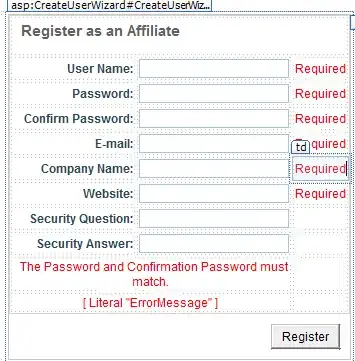
alt text

I'd like to add code in the code behind to perform additional edits. I added the "ErrorMessage" LiteralControl. How do I access it from the code behind or is there a preffered way to display a custom message using the control's functionality?

Chad
  • 23,658
  • 51
  • 191
  • 321

1 Answers1

2

Suggest using the CreateUserWizard property CreateUserButtonStyle-CssClass.

Define yourself a new class:

<style type="text/css">
   .foo{
          margin-left: 120px;
    }
    </style>

Then set the wizard button property:

   <asp:CreateUserWizard CreateUserButtonStyle-CssClass="foo" 

The only problem is that the markup emitted has the alignment as "right" instead of what we want: "left".

See this image for a look in Firebug if the table cell alignment was set to LEFT.

Solve the right/left <td> contents alignment problem, and you're set!

Use jQuery to find this button, get its parent <td>, and set its align attribute to left.

<head>
<script type="text/javascript" src="http://ajax.googleapis.com/ajax/libs/jquery/1.4/jquery.min.js"></script>

<style type="text/css">
    .foo
    {
        margin-left: 120px;
    }
</style>

 <script type="text/javascript">
     $(document).ready(function () {
         var btn = $("#CreateUserWizard1___CustomNav0_StepNextButtonButton");
         btn.parent().attr('align', 'left');

     });
 </script>
<head>

Repro of this setup at: http://pastebin.org/698287

Here's how it renders:

alt text

p.campbell
  • 98,673
  • 67
  • 256
  • 322
  • $("#CreateUserWizard1___CustomNav0_StepNextButtonButton") evakuated to null. I dont know JQuery and instead tried this but do the same result: var btn = document.getElementById("ctl00_phPageContent_CreateUserWizard1___CustomNav0_StepNextButtonButton"); Can you suggest a server side solutioin? I realy despise hard coding references to ugly generated IDs. – Chad Aug 22 '10 at 02:08
  • Note that the ID that you search for was different tan the one that I saw when I viewed the source, though I had no luck using the ID I saw. – Chad Aug 22 '10 at 02:14
  • @Velika: I've included a repro in the answer. All you have to do with the jQuery is find the ID of the button, and paste into the `$("#")`. Ensure you put the script reference to jQuery 1.4 as the first script element in your ``. – p.campbell Aug 22 '10 at 02:34
  • I used straight javascript and your approach worked, thx – Chad Aug 22 '10 at 03:01
  • iT WOULD BE NICE TO HAVE A SERVER-SIDED APPROACH that doesn't rely on Javascript being enabled – Chad Aug 22 '10 at 21:59
  • @Velika: Indeed. The wizard-server-controls are notorious about not allowing you to customize the markup as you wish. It's disappointing that you can't specify the HTML for the submit button. – p.campbell Aug 22 '10 at 22:45