I've read some info about authentication, but I would have thought that I could turn off my app's visibility and/or access to the public. This would be useful for alpha testing so surely a setting like this exists? Or do I need to build such things into the app itself?
Asked
Active
Viewed 540 times
0

-
1How would your app (with such setting, assuming it exists) distinguish between you and someone else? – Dan Cornilescu Dec 02 '15 at 03:39
-
Google authentication - but I see your point. – Warren Dec 02 '15 at 03:41
-
Dan - I think your question has answered my question with the answer being 'no'. – Warren Dec 02 '15 at 03:43
-
I'm now just using php to "hide" it: http://stackoverflow.com/questions/286938/what-is-the-best-way-to-password-protect-folder-page-using-php-without-a-db-or-u – Warren Dec 02 '15 at 03:43
5 Answers
0
Without some sort of authentication mechanism your app can't really distinguish between a request coming from you and one coming from someone else.
It might be a good idea to spend a bit of time to analyze your app's authentication requirements and maybe get it done now, while still in alpha. Depending on the solution it may be fairly simple to integrate.
Google offers multiple authentication options, see What is the difference between Google identity toolkit, Google OAauth and Google+ sign in
I personally opted for the GIT kit for simplicity, flexibility and convenience.

Community
- 1
- 1

Dan Cornilescu
- 39,470
- 12
- 57
- 97
0
It's possible secure your App's urls so only an authorised user or administrator can access them.
This can be done through the app.yaml file (Python, PHP and Go applications) or the web.xml deployment descriptor (Java applications).

Jamie Adams
- 23
- 3
0
Option A: Just allow only admin access, in yourapp.yaml
- url: /*
  login: admin
  script: yourappname.app
Option B: If you have an static IP (or with a few changes a week), you can detect the IP of the request and let run only from your IP:
class yourHandler(webapp2.RequestHandler):
    def get(self):
        userIP=self.request.remote_addr
        if userIP=="220.123.211.120"  # Change this with your static IP
            ...your code for authorized users.
Option C: Check request domain (to ensure is called from your own authorized domains), and put some security client side.
class yourHandler(webapp2.RequestHandler):
    def get(self):
        origin=self.request.headers['Origin']
        if origin=="www.yourdomain.com"  # Change this with your domain/subdomain
            ...your code for authorized users.

       # I recommend to put also the CORS headers for your own domain
        self.response.headers['Access-Control-Allow-Origin'] = "www.yourdomain.com"
Personally, I have a mix of the three options plus a custom authentication to access private content.

Rene Marty
- 531
- 4
- 14
0
By default, every service is born public. Change that, individually, by changing the --ingress setting for the service you want.
gcloud beta app services update <service-name> --ingress <value>
all(default): public to internet.internal-only: only accessible for resources in the same Cloud Project.internal-and-cloud-load-balancing: only accessible for resources in the same Cloud Project. And those requests came from configured Cloud Load Balancing.
1 Gateway + a bunch Microservices architecture example:
gcloud beta app services update ms-payment --ingress internal-only
gcloud beta app services update my-backend-gateway --ingress all << default!! Just for example purpose.
In this way, ms-payment is accessible only by resources within the same Cloud Project, even if they are in different VPCs.
Refer the documentation: https://cloud.google.com/appengine/docs/standard/java11/application-security#ingress_controls

Danilo Moreira
- 21
- 4
-
I've tried doing this but now I'm getting the No 'Access-Control-Allow-Origin' header is present on the requested resource. error, which wasn't happening until I changed ingress to internal. I know I'm setting the header as I've tested on postman, the issue only starts once ingress is set to internal. any ideas why that might be? – Jul Oct 19 '21 at 11:09
0
I've found recently that you could also use IAP (Identity-Aware Proxy) IA-what? I found a tutorial that implements it on App Engine.
Tutorial for App Engine.
So I didn't want to rely on my own authentication implementation because I'm not an expert, and security it's something very hard to learn in a rush. In a nutshell
- Deploy an
IAPstep 1 - Add your app engine (or the whole scope) to your
IAP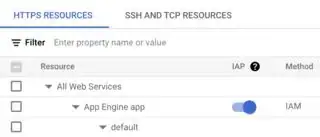
- add your authorized emails on the left panel step 3. For access use:

IAP-Secured Web App User: Grants access to the app and other HTTPS resources that use IAP.
My Personal opinion here: try to implement as many safety measures as possible (don't rely on one system only), usually they could fail.

Pablo
- 3,135
- 4
- 27
- 43