12

I have a problem getting a iOS Development signing identity into Xcode. I have tried loads of things to get it working but I keep failing.

I have went the automatic way and let Xcode do it all but I kept going in circles where Xcode kept saying:

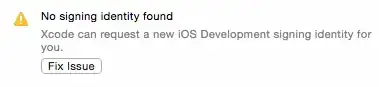
No signing identity found. Xcode can request a new iOS Development signing identity for you.

Followed by:

Your account already has a valid certificate. If you have your signing identity on another Mac, you can import a developer profile. You can also revoke the current certificate and request one again.
enter image description here

I have done many steps:

  • Removing my account from within Xcode's preferences.
  • removing everything from the key chain app.
  • clearing everything from within the developer member center (apple developer website)
    • removing all provisioning profiles
    • removed my device
    • revoked all all my certificates
  • restarted Xcode to perform a 'Clean' project from the Product menu.
  • even went into my project.pbxproj file to clear anything related to PROVISIONING_PROFILE
  • removed all provisioning profiles from my device.

After this I went back into Xcode:

  • added my account into the preferences section
  • clicked View Details
  • did a refresh
  • Xcode automatically creates two certificates
  • Xcode automatically creates provisioning profiles
  • Xcode only creates a single Signing Identity: only for iOS Distribution. This is my problem: I can not get an iOS Development signing identity. enter image description here

After not getting it to work I went the old fashion manual way:

  • first clearing everything like the above
  • created new certificates manually, downloaded them and added them to the key chain app. enter image description here
  • created new provisioning profiles manually, downloaded them and dropped them onto the xcode app icon. enter image description here enter image description here At the end the result is the same; When I am in Xcode > preferences > accounts > view details:
  • I do have a distribution signing identity
  • I do NOT have a development signing identity

When I click the + button under the Signing Identities and choose 'iOS Development' nothing happens..

I have found lots of posts here on StackOverflow, I tried their suggestions but it won't work for me. Examples of other posts: here, here and here

I am working with the latest version of Xcode: 6.2. I am working on an app which is already in the App store.

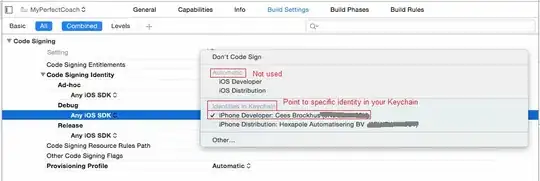
Edited: I have also changed the code signing build settings of my project and target into Don't code sign and put it back to iOS Distribution for ad-hoc and iOS Development for Debug. enter image description here

Cœur
  • 37,241
  • 25
  • 195
  • 267
Brabbeldas
  • 1,939
  • 4
  • 20
  • 32
  • 1
    Have you also created a new dev cert (manually) in the portal? I think I see where you tried from within XCode but want to make sure. It may also help to include screen shots of your Dev Portal, XCode and Keychain Access. Please mask sensitive info. – Dan Mar 22 '15 at 12:53
  • @Dan, thanks for your response. yes, i have tried it both automatic and manual, the result is the same. i have added some screenshots as you requested.. is there anything else i can add or other info you need to be able to help? – Brabbeldas Mar 22 '15 at 18:02
  • You tied the new certs into the provisioning profiles? – Dan Mar 22 '15 at 18:19
  • yes, the certificates are linked to he new profiles. – Brabbeldas Mar 22 '15 at 18:21

3 Answers3

8

Together with a very helpful person on the Apple Developer forums we have tried to figure this out.

I was so blinded by it not working, it never came to mind to try out and build another project and to see if that would work. I was completely focused on my certificates and profiles within the member center and my account details within xcode. When I did try to build another (random) project, it worked in one go. This told us it must had something to do with the Build Settings of that one specific project which xcode could not code sign.

At the end, in xcode I went to the Build Settings of my Target. Within the Code Signing section I changed the values of Any iOS SDK to point to a specific Identity in my Keychain instead of having them on automatic (iOS Developer / iOS Distribution). This fixed my issue and I was able to build/deploy to my device and I was able to upload a new build to iTunes Connect.

enter image description here

Brabbeldas
  • 1,939
  • 4
  • 20
  • 32
1

It takes a long time, and we did all the above solutions and they didn't work at all so our team decided to remove Pod files and run pod install again. finally, our OTA uploaded ipa installed on the user's device. best Solution

  1. clean project menu > Product > Clean Build Folder and /Users/{you user name}/Library/Developer/Xcode/DerivedData
  2. go to your project directory and remove Podfile.lock ,Pods folder,pod_***.framework
  3. run pod install again
Nimantha
  • 6,405
  • 6
  • 28
  • 69
Amir Ardalan
  • 389
  • 3
  • 7
0

Brabbeldas, did those build setting changes end up getting the iOS Developer certificate showing in the Xcode > Preferences > Accounts > (your account) > View Details > Signing Identities pane?

There was a transient certificate generation issue resolved yesterday (March 26) at around 2:30PM PDT which restored missing Organization Unit fields to iOS developer certificates that also exhibited this symptom (missing developer certificate in the accounts > view details > signing identities pane).

If it's still missing you are probably still affected by this problem. To confirm, double click your iPhone Developer certificate in Keychain Access. The issue is still present if the certificate is missing its Organization Unit field. If your Organization Unit field is present, you're fine. The Organization Unit should be set to the value of your Team ID.

The full symptoms of this problem are:

  • iOS Developer certificate either shows as Revoked, or doesn't show at all in the Preferences > Accounts > (your account) > View Details > Signing Identities pane.
  • frameworks signed with the certificate fail to load with dyld: Library not loaded: [your_signed_framework]

Since the certificate server issue is now fixed, resolve the problem with:

  1. revoke affected developer certificate on the website
  2. click the "⟳" button in Xcode > Preferences > Accounts > (your account) > View Details
  3. regenerate any custom developer profiles on the website, download and install those into Xcode

As an additional way to diagnose the problem with signed frameworks, use codesign -dvvv your_signing_framework.dylib. The TeamIdentifier field will be not set for affected certificates instead of your Team ID.

Bobjt
  • 4,040
  • 1
  • 29
  • 29