Please forgive me, there are already a ton of questions on how to add a UIBarButtonItem to a NavigationBar programmatically but I just can't seem to get any of the solutions to work in my situation.
Here is the layout of a simple test app I have been working with to learn the UIPageViewController.
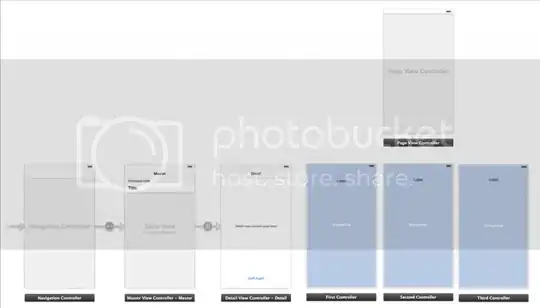
I have the page view controller working nicely with three unique viewControllers. I would now like to set unique rightBarButtonItems for each of the view controllers. I can easily set a common barButtonItem in the DetailViewController by simply doing this.
UIBarButtonItem *newButton = [[UIBarButtonItem alloc] initWithTitle:@"Whatever"
                              style:UIBarButtonItemStylePlain
                              target:self
                              action:@selector(doSomething)];

self.navigationItem.rightBarButtonItem = newButton;
Given that I need a unique button for each of the three pages in the pageViewController I am not able to set the button in the detailViewController. I have tried the code above in viewDidAppear of the three controllers but the buttons will not appear. I have also tried creating the button in the same way and then setting it like this with no luck.
DetailViewController *vc = [[DetailViewController alloc] init];
vc.navigationItem.rightBarButtonItem = newButton;
I know I'm close here, I'm just not sure how to specify I need to add a button to the NavigationBar of the NavigationController that is running the detailViewController that my contentViewControllers are embedded in. Any help would be great ESPECIALLY SNIPPETS.
As a side note I have tried a few other methods that have come up problematic.
- Setting the button in
viewDidLoadrather thanviewDidAppear- This will not work because the
viewDidLoadmethod is not called everytime you swipe from one page to the next. TheviewDidAppearmethod is however so I am trying to set the button there. It is possibleviewWillAppearis called everytime but I haven't checked.
- This will not work because the
- Setting the button in the UIPageViewController delegate methods
- This is problematic if the user flips through the pages to quickly the button will fail to change or fail to appear.
SOLUTION
It turns out I was close… Rather than creating the button in the UIPageViewController methods I simply needed to create a navigationItem property in each of my three view controllers. When the controllers are instantiated in the delegate methods I simply set the navigationItem property equal to that of the detailViewController. That way in my viewDidApper methods I could create the button. Then at viewWillDisappear I set the button to nil. You can also just create the button at viewdidLoad of the DetailViewController and change the text and action in viewDidAppear of the individual viewControllers. Here is a sample.
In the delegate methods
- (UIViewController *)pageViewController:(UIPageViewController *)pageViewController viewControllerBeforeViewController:(UIViewController *)viewController

- (UIViewController *)pageViewController:(UIPageViewController *)pageViewController viewControllerAfterViewController:(UIViewController *)viewController
I call a helper method based on the index of the viewController. The helper method instantiates the view controllers when it is called. Once instantiated I set some properties including the navigationItem property.
-(FirstController *)controllerAtIndex:(NSUInteger)index
{

    FirstController *fvc = [self.storyboard instantiateViewControllerWithIdentifier:@"FirstPageController"];
    fvc.imageFile = self.pageImages[index];
    fvc.titleText = self.pageTitles[index];
    fvc.pageIndex = index;
    fvc.navItem = self.navigationItem;
    return fvc;

}
Then in the viewDidAppear of the viewController I just do this
-(void)viewDidAppear:(BOOL)animated
{

    UIBarButtonItem *newButton = [[UIBarButtonItem alloc]
                               initWithTitle:@"Whatever" style:UIBarButtonItemStylePlain target:self action:@selector(doSomething)];
    navItem.rightBarButtonItem = newButton;

}


